Complete Guide to Testing in Azure Data Factory 

Article by:
Synextra
graphic showing types of testing in azure data factory

Azure Data Factory is a brilliant tool for creating and managing data pipelines in the cloud. It manages tasks from simple data copies to complex ETL workflows and beyond. 

But for all its power, there’s one area where it falls surprisingly short: testing. 

In traditional software development, writing tests alongside your code is second nature. You write a function, you write a test for it. But with ADF, pipelines are often built, deployed, and validated through manual runs in a live environment.  

That approach works fine when your pipelines are simple, but as complexity grows, so does the risk of something breaking in ways you didn’t expect. Testing is the solution. 

This guide covers why properly testing your Azure data pipelines matters, and how to get started. We’ll look at where ADF’s native tooling falls short, and how the open-source Data Factory Testing Framework can help fill the gap. 

A quick overview of Azure Data Factory

 If you’re already familiar with ADF, feel free to skip ahead. For everyone else, here’s the short version. 

Azure Data Factory is Microsoft’s cloud-based data integration service. It lets you create data-driven workflows (called pipelines) that move and transform data between different stores and services. 

You might use it to pull data from an on-premises SQL Server into Azure, transform it along the way, and load it into a data warehouse for reporting. Or you might use it to orchestrate more complex processes involving multiple data sources, APIs, and conditional logic. 

Pipelines are built from activities – the individual steps in your workflow. These can range from simple copy operations to stored procedure calls, web requests, and custom scripts. Activities can be linked with dependencies. You can also use expressions and parameters to build dynamic, reusable pipelines. 

It’s worth noting that Microsoft has also introduced Fabric Data Factory, which brings data integration capabilities into the broader Microsoft Fabric platform. The two share a lot of DNA, and if you’re evaluating your options, it’s worth understanding how they relate. (In this guide, the testing principles we cover apply to both.) 

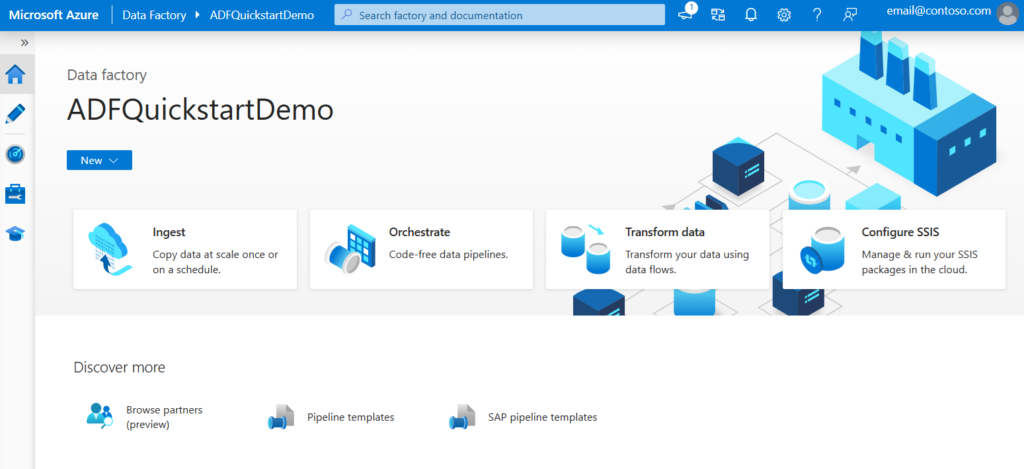
ADF homepage screenshot

Why testing matters in Azure Data Factory

Data pipelines tend to grow more complex than anyone originally intended. 

What starts as a straightforward copy activity quickly picks up conditional branching, parameterised expressions, error handling, and dependencies on other pipelines. Soon, you have something that’s really hard to understand. 

Without proper testing, issues show up in two ways: a pipeline either fails loudly in production, which is disruptive but obvious, or it succeeds and gives wrong results. The second option is worse because you might not notice the errors for days or weeks. An expression that evaluates correctly for most inputs but breaks on edge cases. A conditional branch that never gets triggered during development but fires unexpectedly with real data. 

These are the kinds of issues that testing catches early. 

There’s also iteration speed to think about. If you can only validate changes by deploying them and running the pipeline on a live or dev instance, every small tweak means a deploy-run-check cycle. This can take up a lot of your time. Automated testing helps you validate your logic quickly and easily. This way, you can work faster and feel more confident. 

For teams practising CI/CD and following Azure DevOps best practices, automated tests for data pipelines are a natural extension of what you’re already doing for application code. It fills a gap that’s easy to overlook. 

The problem: ADF doesn’t have built-in testing

Despite being a mature and widely adopted service, Azure Data Factory doesn’t offer any native unit testing capability for testing your pipeline logic independent of live data sources.

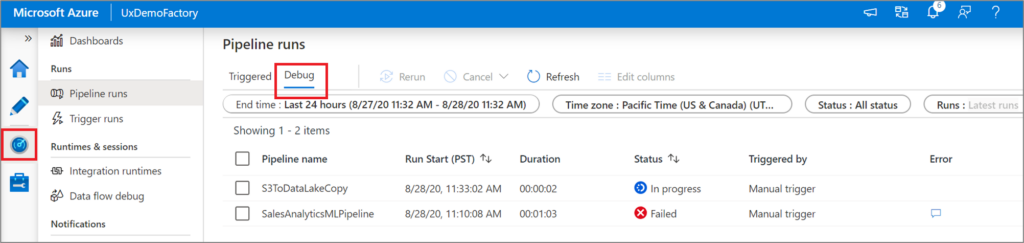
It does have debug mode for interactive pipeline runs and a validation feature that checks for structural errors like missing references. These are useful in their own right. But neither is a substitute for proper unit testing. You can’t test a pipeline definition locally. There’s no way to validate that your expressions evaluate correctly with certain inputs. And you can’t confirm if your activities execute in the right order under specific conditions. 

Your options without third-party tooling are limited. You can deploy your pipeline to a development instance and trigger a run, then manually check the output. You can use debug mode to run a pipeline interactively and inspect the results. Both of these approaches involve actually running the pipeline. This means you need live connections to your data sources. You’re consuming compute resources, and each test cycle takes however long the pipeline takes to execute. 

Azure data factory debug runs screenshot

For simple pipelines, this is manageable. For complex ones with dozens of activities, conditional paths, and dynamic expressions, it becomes a real bottleneck. It’s also difficult to test specific edge cases or failure scenarios when you’re relying on live runs, because you’d need to set up the exact conditions to trigger each code path. 

This is a well-known gap. It’s not unique to ADF either, as many data orchestration tools have historically lacked proper testing support. But the good news is that there’s now a solid option for filling it. 

The Data Factory Testing Framework

The Data Factory Testing Framework is an open-source Python framework hosted under Microsoft’s GitHub organisation. It’s designed specifically for writing unit tests against Data Factory pipeline definitions, without needing to actually run the pipelines. 

A few important things to know upfront. The framework is community-supported, which means there’s no official Microsoft SLA for features or bug fixes. It works with Azure Data Factory, Fabric Data Factory, and Azure Synapse Analytics (specifically its pipeline runtime, often called Synapse pipelines). And it’s focused purely on unit testing: it evaluates pipeline and activity definitions rather than executing them against live data sources. 

What it actually does is parse your pipeline JSON definitions and let you assert against them. You can test that expressions evaluate correctly for given inputs, verify that activities receive the right parameters, and check that the execution flow through a pipeline follows the expected path based on specific conditions. It aims to support all the functions and arguments available in ADF’s expression language, so you’re testing against the same logic that runs in production. 

This makes it really useful for catching the kinds of issues that are hardest to spot in manual testing: 


  • Expression errors that only surface with certain inputs 
  • Branching logic that doesn’t behave as expected 
  • Parameter handling that breaks when values are missing or unexpected 

Getting started with the Data Factory testing framework

The framework is available as a Python package on PyPI, so getting it installed is straightforward: 


pip install data-factory-testing-framework 


Once installed, you initialise it by creating a TestFramework instance and pointing it at the folder containing your pipeline definitions. These are the JSON files that ADF uses to define your pipelines, which you’ll have if your factory is connected to a Git repository (which it should be, for all sorts of reasons beyond testing). 


from data_factory_testing_framework import TestFramework, TestFrameworkType 

test_framework = TestFramework( 
framework_type=TestFrameworkType.DataFactory, 
root_folder_path="/path-to-your-factory", ) 


If you’re working with Fabric Data Factory instead, you’d use TestFrameworkType.Fabric here. The framework automatically loads all the pipeline and activity definitions from the folder you specify. 

From there, you can access your pipelines through the test_framework.repository property and start writing tests using your preferred Python testing tool (pytest is the most common choice). 

Activity testing vs pipeline testing

The framework supports two types of tests, and understanding the difference helps you decide where to focus your effort. 

Activity testing is about testing individual activities in isolation. You pick a specific activity from a pipeline, set up a state with the parameters and variables it needs, evaluate it, and assert against the results. This is useful for validating that expressions within an activity resolve correctly. 

For example, if you have a web activity whose URL is built from a global parameter and a variable, you can test that the concatenation produces the right result without running the entire pipeline. You set up the state with specific values, evaluate the activity, and check the output. 


from data_factory_testing_framework.state import PipelineRunState, 
RunParameter, RunParameterType from 
data_factory_testing_framework.state.run_parameter 
import PipelineRunVariable 
 
# Get the activity from your pipeline activity = 
pipeline.get_activity_by_name("MyWebActivity") 
 
# Set up the state state = 
PipelineRunState( parameters=[ 
RunParameter(RunParameterType.Global, "BaseUrl", 
"https://api.example.com"), ], variables=[ 
PipelineRunVariable("Path", "/data/export"), ], ) 
 
# Evaluate and assert activity.evaluate(state) assert 
activity.type_properties["url"].result == 
"https://api.example.com/data/export" 


Pipeline testing takes a broader view. Instead of testing a single activity, you test the execution flow of an entire pipeline. You provide input parameters and then iterate through the activities as the framework evaluates them, asserting that the right activities run in the right order. This is where you can validate conditional logic, verify that branches are followed correctly, and check that the pipeline behaves as expected for different sets of inputs. 

Pipeline testing is great for validating that your automation workflows handle different scenarios correctly, especially when pipelines include If Condition, Switch, or ForEach activities that create multiple execution paths. 

Fitting testing into your CI/CD workflow

Unit tests are most valuable when they run automatically. If you’re already using Azure DevOps or GitHub Actions to deploy your data factory changes, adding the testing framework to your pipeline is a natural next step. 

The general approach is to run your tests as an early stage in your deployment pipeline, before changes are deployed to any environment. Because the tests evaluate pipeline definitions rather than running them, they execute quickly and don’t need any connections to live data sources. A failing test blocks the deployment, which means broken logic gets caught before it reaches your development or production environment. 

This fits neatly into a broader DevOps workflow for data platform management. Your factory definitions live in Git, your tests live alongside them, and your CI pipeline validates everything on each commit. It’s the same pattern that application developers have used for years, applied to data engineering. 

If your data factory isn’t connected to Git yet, that’s the first step. The testing framework works against the JSON pipeline definitions that Git integration produces, so without it, there’s nothing to test against. 

Building a testing habit in ADF that sticks

You don’t need to write tests for every pipeline and every activity on day one. Start with your most critical pipelines, the ones where a failure would cause the most pain, or the ones with the most complex logic. Even a handful of well-targeted tests can catch issues that would otherwise slip through. 

Focus on the areas where manual testing is weakest: 


  • Expression logic with multiple possible inputs 
  • Conditional branches that are hard to trigger manually 
  • Pipelines where the interaction between parameters, variables, and activities creates complexity that’s difficult to reason about by reading the JSON alone 


The Data Factory Testing Framework lowers the barrier to testing significantly. It’s not perfect, and it won’t replace integration testing against a real environment entirely. But it fills a gap that’s been empty for too long, and for teams managing complex data pipelines, it’s well worth adopting. 

If you’re looking for support with your Azure data platform, whether that’s building out your pipelines, improving your DevOps practices, or getting testing and automation right, we’re always happy to chat. Get in touch today to find out more. 

Subscribe to our newsletter

Stay ahead of the curve with the latest trends, tips, and insights in cloud computing

thank you for contacting us image
Thanks, we'll be in touch.
Go back
By sending this message you agree to our terms and conditions.