Microsoft Fabric vs Databricks: Choosing the Right Data Platform 

Article by:
Synextra
graphic showing microsoft fabric vs databricks

Microsoft Fabric and Databricks. For the modern IT team, these two names are currently battling it out for the title of ‘favourite data platform.’ On paper, they’re direct rivals: both handling engineering, analytics, and AI on a lakehouse foundation.  

Underneath, they have opposite approaches. Fabric is a unified SaaS suite that Microsoft runs for you. Databricks is a code-first platform that hands your engineers the controls. That difference shapes almost everything else: cost, the skills you need, and how quickly you get to value. 

We’ll cover what each one actually does and compare them across the areas that drive the decision. We’ll also look at where each fits best for different situations. 

What the two data platforms are for

Most organisations have data spread across separate systems: finance, CRM, operations, the website, and more. On their own, those systems struggle to answer questions that span across them, like which customers are most profitable or where a process is losing money. 

A data platform brings that scattered data together, cleans it up, and turns it into the dashboards and forecasts people use to make decisions. Increasingly it also feeds AI, from predicting demand to letting people ask questions of the data in plain language. The payoff is decisions made from one trusted view of what’s happening, rather than from whichever spreadsheet someone exported last week. 

Both Fabric and Databricks are built on lakehouse architecture, which combines the cheap, flexible storage of datalake with the structure and speed of a traditional data warehouse. And both store data in the same open formats (parquet, csv, json, txt etc.) so your data stays non-proprietary rather than tied to one vendor. 

Where they differ is how they go about the job. 

What is Microsoft Fabric?

Fabric is Microsoft’s all-in-one analytics platform, delivered as a single SaaS service. It brought together capabilities that used to live in separate products, like Azure Data Factory, Azure Synapse Analytics, and Power BI Premium, and put them on one shared foundation. It reached general availability in late 2023 and has grown quickly since. 

The heart of Fabric is OneLake, a single managed data lake that every workload reads from and writes to. Data lands once. Every workload reads that same copy rather than shuffling data between tools. 

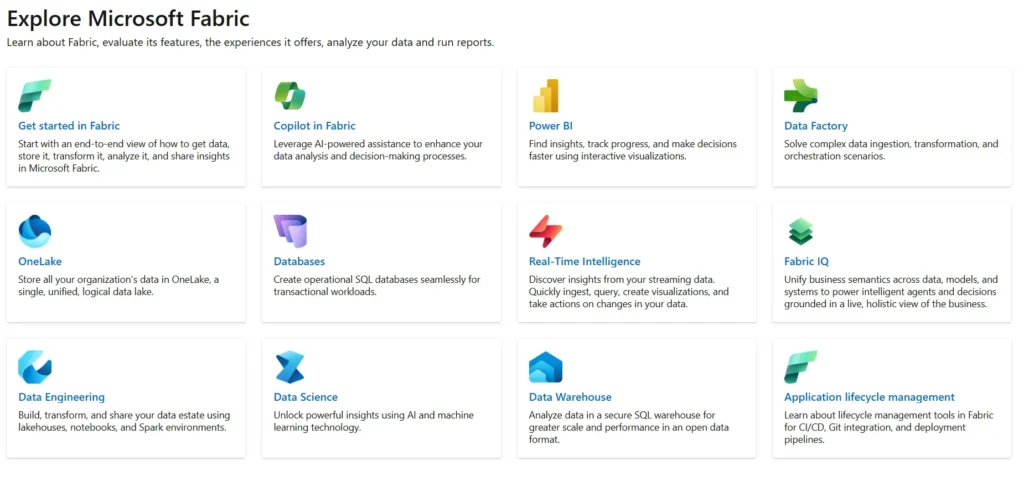
On top of OneLake, Fabric offers a range of workload experiences: 

  • Data Factory for data integration and orchestration, with a wide library of connectors including SAP and Oracle. 
  • Data Engineering for efficient Spark-based transformation across structured and unstructured data, often using medallion architecture to organise data into three layers: bronze for raw data, silver for validated and transformed data, and gold for curated, business-ready data.
  • Data Warehouse for a T-SQL warehouse with full transactional support. 
  • Real-Time Intelligence for event streaming and low-latency analytics, using technologies such as Kafka to ingest and process real-time data for IoT, telemetry, and other event-driven workloads.
  • Data Science for notebooks, MLflow, and AutoML, aimed at exploration rather than heavy production ML. 
  • Power BI for native reporting, including the Direct Lake mode we’ll come back to. 
  • Data Activator for automated alerting and triggering actions when data hits certain conditions. 

Fabric has moved fast during 2026, adding autonomous Data Agents and Copilot features for business users amongst other new features. 

Overview of different services within Microsoft Fabric

What is Databricks?

Databricks is an open lakehouse platform built by the original creators of Apache Spark. It runs as a platform-as-a-service: you bring your own cloud (Azure, AWS, or GCP), and you pay Databricks for compute through units called DBUs. The storage layer is Delta Lake, the open format Databricks invented and that Fabric also relies on. 

The core product stack looks like this: 

  • Delta Lake, the open storage format underneath everything else. 
  • Lakeflow for end-to-end data engineering: ingestion, declarative ETL, and orchestration, with a no-code designer for teams that want one. 
  • Databricks SQL, a serverless SQL warehouse with the Photon engine that competes with Snowflake on performance. 
  • Mosaic AI, the platform’s AI and machine learning layer, covering model serving, vector search, an agent framework, and lifecycle tooling like MLflow. 
  • Unity Catalog for governance across data, models, and apps, now open source. 
  • Lakebase, a Postgres-compatible transactional database built on the lakehouse. 
  • AI/BI Genie for asking questions of your data in plain language. 

Azure Databricks vs Databricks 

Azure Databricks and standalone Databricks are not two different products. They share the same engine, the same Spark runtime, Delta Lake, and Unity Catalog. What changes is how the platform is deployed and how tightly it integrates with the cloud around it. 

Standalone Databricks runs on AWS or GCP, where you handle identity, monitoring, and secrets through those clouds’ tools or third-party setup. Azure Databricks is provisioned through the Azure portal as a first-party service, with native Entra ID, Azure Monitor, and Azure Key Vault built in. It also sits closer to Power BI and OneLake, so data moves with less friction inside an Azure region. 

For most UK organisations already standardised on Azure, Azure Databricks is the version that matters. It lowers the configuration overhead and fits the Microsoft licensing and security posture you’re probably already working within. 

Comparing the two: the differences that matter

Storage and the lakehouse approach 

Both platforms are lakehouses built on open formats, so the Databricks vs Microsoft Fabric lakehouse question is really about where your data lives and who manages it. 

With Fabric, OneLake is a single managed lake that Microsoft runs. You don’t provision or maintain the storage, and every workload shares it, which is simpler to operate. 

With Databricks, Delta Lake sits on storage you own, whether that’s ADLS Gen2, S3, or GCS. You get more control and a cleaner path to multi-cloud, at the cost of managing that layer yourself. Fabric hides the plumbing; Databricks leaves it in your hands. 

Data engineering and warehousing 

This is where Databricks’ heritage shows. Its Spark runtime has had a decade of production tuning, and for heavy pipelines, complex streaming, and change-data-capture at scale, it tends to handle the awkward cases more gracefully. Lakeflow adds mature, software-grade orchestration on top. 

Fabric is definitely capable for mainstream data engineering, and its Data Factory experience grew out of Power Query, so it feels familiar on the Microsoft side. The gap opens up at the top end; very large or bursty pipelines stress Fabric’s Spark environment more than Databricks’. 

BI and Power BI 

If reporting is your main concern, the Databricks vs Fabric for Power BI comparison should settle things. 

Fabric has the strongest Power BI integration on the market, and it’s not close. Its Direct Lake mode lets Power BI read straight from Delta files in OneLake, skipping both the import step and the latency of DirectQuery. So a Power BI-heavy organisation gets close to in-memory speed without the refresh cycles. 

Databricks’ own BI layer, AI/BI Dashboards and Genie, handles internal dashboards and self-service questions but isn’t a Power BI replacement. Power BI connects through DirectQuery, which works well but doesn’t match Direct Lake for a Power BI-first org. If your consumers live in Tableau or another tool, that flexibility can count in Databricks’ favour, but for pure Power BI performance, Fabric leads. 

Direct Lake does come with limits worth knowing about, including constraints on calculated columns plus table-size guardrails that can fall back to DirectQuery. Those details can decide whether Fabric fits a given reporting estate or not. 

Machine learning and AI 

Databricks is the more serious machine learning platform, and it isn’t a narrow lead. Mosaic AI covers the full lifecycle. It’s got experiment tracking, a feature store, model serving at high throughput, vector search, and tooling for building agents. If you’re doing production MLOps, fine-tuning, or retrieval-augmented generation (RAG) at scale, this is the stronger foundation. 

Fabric’s Data Science workload suits exploratory analytics and lighter predictive work, leaning on Azure OpenAI and Copilot to bring AI to business users. For teams whose ambition is calling a model from a notebook rather than running an ML platform, that’s often enough. 

The deployment question sits alongside this, and the distinction between Azure OpenAI and the OpenAI API matters once real data is involved. If your work is more about building agents than training models, the trade-offs we covered in Microsoft Foundry vs Copilot Studio run along similar lines. There’s managed and accessible on one side, engineered and controllable on the other. 

Governance 

Fabric governs through Microsoft Purview, which brings lineage, sensitivity labels, and classification across Microsoft 365, Azure, and Fabric as one estate. For an organisation already inside the Microsoft compliance framework, that’s a lot of governance you don’t have to build. 

Databricks governs through Unity Catalog, the more capable layer in raw terms: fine-grained access control, attribute-based rules, automatic lineage, and model governance, all now open source. It’s particularly strong for data-mesh and multi-cloud estates. The trade-off is that it sits outside the Microsoft identity and compliance stack many UK enterprises have standardised on. 

Either way, the same best practices for Azure security around identity and least-privilege access apply before either platform goes near production. 

Multi-cloud and openness 

Fabric is Azure-only. It can reference data in AWS or GCP storage through OneLake shortcuts, but the platform itself lives on Azure. Databricks runs natively on all three major clouds with genuine production parity, a real advantage for mixed or multi-cloud estates. 

Both use open storage formats, so you’re not locked into a proprietary format either way. Databricks goes further on open source, having released Delta Lake, MLflow, and Unity Catalog, which lowers the long-term lock-in risk if that’s a priority. 

Performance, pricing, ease of use and scalability

Performance 

For Power BI workloads, Fabric’s Direct Lake is the standout, reading Delta files from OneLake at close to in-memory speed. For mixed SQL and Python work, Databricks’ Photon engine is very fast, with serverless GPU options for on-demand model training. On large pipelines and complex streaming, Databricks generally pulls ahead. 

Pricing 

The two platforms charge in structurally different ways, which makes the cost comparison less about a single number and more about your usage shape. 

Fabric bills through capacity units (F-SKUs), which you reserve. You pay for the capacity whether or not it’s fully used, though you can pause it for dev and test. That model rewards steady usage and makes budgeting predictable, with storage and Power BI bundled in. 

Databricks bills through DBUs on a per-second basis, scaling down to zero when idle, with storage and BI licensing charged separately. That rewards bursty and batch-heavy workloads with plenty of idle time, but consumption pricing is harder to forecast, and autoscaling can produce surprises if it isn’t watched. 

As a broad rule, Fabric tends to come out cheaper for equivalent workloads at list price, largely because storage and Power BI are included (though negotiated discounts can narrow that gap at scale). As a very rough order of magnitude, a serious enterprise deployment on either platform tends to land somewhere in the region of a few thousand to several tens of thousands of pounds a month rather than hundreds. Both vendors move their pricing regularly, so treat any figure as indicative and check the current numbers on the official Microsoft Fabric and Databricks pricing pages before you budget anything. 

Ease of use 

Fabric is the easier platform to run, especially for SQL-first and Microsoft-native teams.  

There are no clusters to provision and no Spark configuration to manage. Databricks asks more of you: cluster policies, autoscaling, and DBU cost management are ongoing jobs. Azure Databricks lowers that floor, but it still wants a dedicated data platform skill set. The payoff is far more control. 

Scalability 

Fabric scales up through its capacity tiers, which is straightforward, though very high concurrency or very large pipeline volumes can get expensive. Databricks is built for horizontal scale, supporting very large Spark clusters, serverless GPU for AI, and a per-second model that scales to zero on idle. For the largest workloads, that headroom is one of its main draws. 

Pros and cons of Microsoft Fabric and Databricks at a glance

Microsoft Fabric, on the plus side, gives you all seven analytics workloads on one licence, the best Power BI integration going, tight links to Purview and Entra ID, a low operational floor, and predictable capacity-based budgeting.  

On the downside, it’s Azure-only, its Direct Lake mode has real limits, its ML story trails Databricks, and heavy streaming at scale is less mature. 

Databricks, on the plus side, is the most capable ML and AI platform here, runs natively across three clouds, has the stronger governance layer in Unity Catalog, and handles large-scale data engineering with a decade of Spark tuning behind it.  

On the downside, it carries higher operational complexity, has limited BI capabilities, and its consumption pricing is harder to budget, with a steeper learning curve for teams that aren’t already fluent in Python and Spark. 

When each data platform works best

Choose Microsoft Fabric when 

  • You’re deep in Microsoft already, with Azure, Power BI, Purview, and Entra ID in daily use. 
  • Power BI is the main consumption surface, and semantic models aren’t especially complex. 
  • Your data team is small or SQL-first, valuing a low operational floor over deep control. 
  • SAP or Oracle are your primary data sources. 
  • Budget predictability matters, and fixed capacity billing makes forecasting cleaner. 
  • You want a SQL-first data warehouse with seamless Power BI integration. 


Choose Databricks when 

  • You have a real ML or AI engineering team doing production MLOps, fine-tuning, or agentic AI. 
  • Multi-cloud is present or planned, and native parity across Azure, AWS, and GCP is important. 
  • Data volumes are large, with heavy pipeline throughput or many source systems. 
  • Governance needs are stringent and cross-platform, where Unity Catalog earns its keep. 
  • Your team is fluent in Python and Spark and wants control over runtime and orchestration. 
  • Workloads are bursty or batch-heavy, where per-second billing pays off. 
  • You want a lakehouse where the data warehouse sits alongside large-scale engineering and AI workloads.   

Running both 

Choosing between them isn’t always necessary. For larger organisations, a natural architecture is to run both. You can have Databricks for heavy data engineering, multi-cloud ingestion, and bespoke ML. Then Fabric for governed BI, Copilot-driven analytics, and Data Agents close to the business. 

Raw and refined data gets curated in Databricks, and the business-ready layer is brought into Fabric through OneLake shortcuts or Delta Sharing. Because both platforms speak Delta, the seam between them is thinner than it used to be. 

One governance catch needs thinking about. If you run both, decide which platform is the system of record for each table. If you skip that step, lineage and data auditability can become a real operational burden. 

Where Snowflake fits in

No modern data platform comparison is complete without mentioning Snowflake. 

Snowflake is a cloud-native data warehouse, and its defining trait is the clean separation of storage and compute, so each scales independently. It’s known for strong SQL performance, low administrative overhead, and secure data sharing, and it runs across AWS, Azure, and GCP. Pricing is usage-based through credits, with warehouses that auto-suspend and resume to keep compute costs in check. If enterprise data warehousing and SQL analytics are the priority, Snowflake is a serious contender. 

It’s been pushing hard into AI, too. Its Cortex layer brings LLM functions, semantic search, and agentic analytics into the warehouse. They’re callable from SQL, with Snowflake Intelligence giving business users natural-language querying. In early 2026 it moved AI usage onto a separate credit currency, decoupled from standard edition pricing. 

The lines between the three have blurred, but their origins still shape the best fit: Fabric for unified analytics and Power BI, Databricks for large-scale engineering and AI, and Snowflake for rock-solid SQL warehousing and data sharing.  

Interoperability has improved too. Microsoft and Snowflake have committed to letting Snowflake work against data in OneLake through open formats like Iceberg and Parquet, making mixed architectures far more practical than a couple of years ago. 

Choosing the right platform for your data

The short version: Fabric and Databricks aren’t the same kind of tool wearing different badges. Fabric is a managed suite built for speed, simplicity, and Microsoft-native teams that live in Power BI. Databricks is an engineering platform built for control, scale, and serious AI, and it expects a team that can make the most of it. Snowflake sits alongside both as the warehousing specialist. 

For a lot of organisations the answer is a considered combination rather than a single winner, and getting the split right is the part worth thinking hardest about. That means matching it to your business needs, your scalability requirements, and how data-driven your organisation is today and where it’s heading.

As an Azure Data and AI Microsoft Solutions Partner, it’s exactly the kind of decision we enjoy getting stuck into. If you’d like a hand weighing up the options for your business, get in touch and we’ll talk it through. 

Subscribe to our newsletter

Stay ahead of the curve with the latest trends, tips, and insights in cloud computing

thank you for contacting us image
Thanks, we'll be in touch.
Go back
By sending this message you agree to our terms and conditions.