Azure Synapse to Fabric migration: How and When to move 

Article by:
Synextra
graphic showing moving from Azure Synapse to Microsoft Fabric

Azure Synapse Analytics is not being switched off. But if you run it today, you’ve probably noticed that Microsoft’s attention has moved. New capabilities land in Microsoft Fabric, and the Synapse documentation increasingly points you towards Fabric migration guides. 

That puts Synapse customers in an awkward middle ground. There’s no deadline forcing a move, but staying put means running a platform that isn’t evolving. This article covers what’s actually happening to Synapse, and how the two platforms differ. We also look at where Databricks fits into the picture, and how to approach an Azure Synapse to Fabric migration if you decide it’s the right call. 

Is Azure Synapse being retired?

No. As of writing, Microsoft has not announced an end of life date for Azure Synapse Analytics. Dedicated SQL pools, serverless SQL pools, Spark pools and Synapse Pipelines are all still supported and still receive security updates. When Fabric launched, Microsoft stated in its own guidance for existing Synapse users that it had no current plans to retire Synapse, and that any change would come with advance notice under its lifecycle policy. 

So if you search for “Azure Synapse end of life” or “Azure Synapse deprecated”, the accurate answer is that neither has happened. The better way to look at it is maintenance mode rather than being sunsetted. 

The evidence for that is in where new features are being added. Direct Lake (a Power BI mode that reads Delta tables from the lake directly, with no import step) is Fabric-only. OneLake mirroring, Copilot in Fabric and Data Activator are all Fabric-only too. None of them are being ported to Synapse. Microsoft also reported over 40,000 paid Fabric customers in its FY26 Q4 earnings call, up more than 60% year on year. That’s where the investment and the momentum are. 

Our view is that Synapse is a safe place to run existing workloads for now, but not a platform to build anything new on. Whether you migrate in six months or three years, it makes sense to plan for Fabric as the destination. 

Azure Synapse vs Fabric: what’s actually different

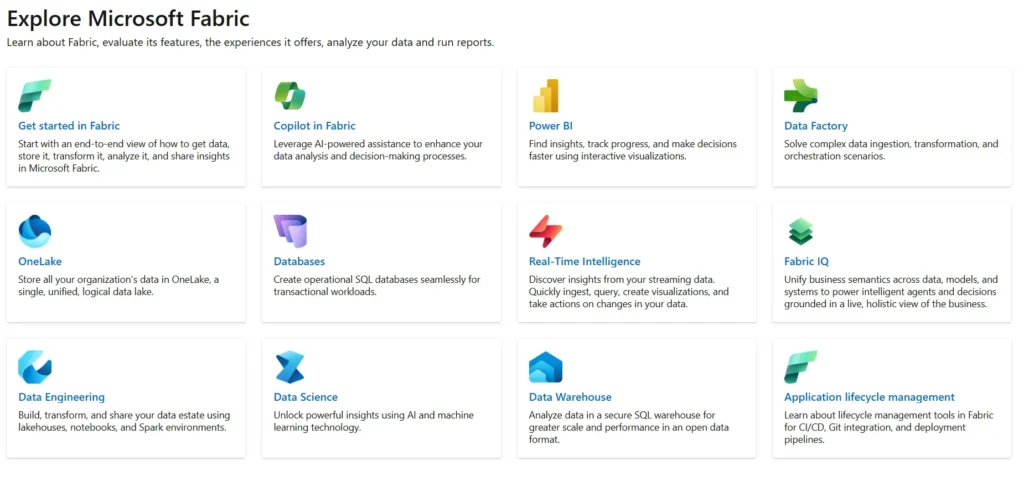
Overview of different services within Microsoft Fabric

The two platforms overlap heavily in what they do. The difference is in how they’re built and how you pay for them. 

Synapse is a platform-as-a-service (PaaS) offering made up of separate components. You provision a dedicated SQL pool for warehousing, a Spark pool for engineering, and pipelines for orchestration, and each is sized, managed and billed separately. Your data sits in Azure Data Lake Storage Gen2 (ADLS Gen2), and Power BI connects to it as an external source. 

Fabric is a software-as-a-service (SaaS) platform where Microsoft runs the infrastructure and you consume capacity. Everything sits on OneLake, a single tenant-wide data lake, and every workload (Data Factory, Warehouse, Data Engineering, Real-Time Intelligence, Power BI) reads and writes to the same copy of the data. Our Microsoft Fabric overview goes deeper on how the pieces fit together. 

Azure Synapse Microsoft Fabric 
Model PaaS, component-based Unified SaaS suite 
Storage ADLS Gen2, per workspace OneLake, one copy across the tenant 
Pricing Per component: DWUs for dedicated SQL, per TB scanned for serverless, per vCore-hour for Spark Capacity Units (F SKUs), shared across all workloads, plus OneLake storage 
Power BI External connector Native, with Direct Lake 
Governance Azure RBAC per resource Workspace roles, OneLake security, Purview integration 
Roadmap Maintained, no new features Active, regular releases 

ADLS Gen2 is Azure Data Lake Storage, the file storage Synapse sits on. DWUs are Data Warehouse Units, the bundled compute measure you pick a level of when you provision a dedicated SQL pool. F SKUs are Fabric’s capacity sizes, from F2 up to F2048, each providing a set number of Capacity Units that every workload in the tenant draws from.  

Purview is Microsoft’s data governance service for cataloguing, labelling and tracking data across the estate. 

On Microsoft Fabric vs Synapse pricing, there is no like-for-like comparison. Synapse bills each component on its own meter, so a dedicated SQL pool costs money whether or not anyone’s querying it.  

Fabric bills one capacity that all workloads draw from, with the option to pause it. From F64 upwards, people who only view Power BI reports no longer need their own Pro licences, though anyone building or publishing reports still does. Which works out cheaper depends entirely on your usage.  

The Fabric pricing page and Synapse pricing page are the places to model it, and our Azure cost management guide covers the general principles for keeping either under control. 

Where Databricks fits in between Azure Synapse and Fabric

Any Azure Synapse vs Databricks vs Fabric conversation needs a caveat: Databricks isn’t a like-for-like alternative to either. It’s a code-first lakehouse platform built around Apache Spark, with its own governance layer (Unity Catalog). It also has a much deeper machine learning toolset (MLflow, model serving, feature store), and the ability to run on Azure, AWS or Google Cloud. 

For Synapse customers weighing up where to go, the split is fairly clean.  

If your workloads are mostly SQL warehousing and Power BI reporting, Fabric is the natural successor. If your workloads lean heavily on data engineering, data warehousing, ML processing, and AI work loads, Databricks deserves a serious look. 

It can be useful to run both: Fabric for BI-centric analytics and Databricks for the heavy engineering and ML. OneLake shortcuts can let Fabric read Databricks’ Delta tables without copying them. 

We’ve written a full Microsoft Fabric vs Databricks comparison if you want to dig into that decision properly. 

Why you might want to migrate

Nobody is forcing a move, so the reasons need to be about future-proofing the data platform rather than reacting to pain points. The main ones we’d point to: 

Feature gravity. Direct Lake, mirroring, Copilot and the growing set of AI capabilities only exist in Fabric. If your Power BI team wants Direct Lake performance on large models, or your analysts want Copilot over the warehouse, migration is the only route. 

One copy of the data. One Synapse architecture you might see is ADLS Gen2, a pipeline into a dedicated SQL pool, then Power BI datasets importing from there. That’s three copies of the same data, each with its own refresh schedule. Fabric collapses that to one copy in OneLake, which cuts storage and pipeline sprawl and removes a whole class of “why don’t these numbers match” problems. 

Simpler operations. No more sizing Spark pools or pausing dedicated pools by hand. Fabric handles the infrastructure, which helps teams without a dedicated platform engineer. 

Roadmap risk. The longer you stay on a platform that isn’t moving forward, the bigger the gap gets between what you have and what Microsoft is building. Migrating on your own timetable is easier than forcing a move because something has finally been retired. 

How to migrate Synapse to Fabric

There’s no single button that does this for you. Microsoft has released tooling for parts of the journey, but a migration is still a project with phases, and it should be done carefully. 

  1. Assess before you touch anything

Inventory every SQL pool, Spark pool, pipeline, linked service and notebook. More importantly, inventory every downstream consumer: Power BI reports, scheduled jobs, external APIs, anything that reads from Synapse. The data itself rarely breaks a cutover. What breaks it is all the things pointing at the old platform: connection strings, refresh schedules and report data sources that still expect Synapse to be there. 

For the Spark side, Microsoft’s Fabric Assessment Tool scans a Synapse workspace and reports objects, dependencies and compatibility blockers. Run it first. 

  1. Design the OneLake target

Decide on your workspace and domain layout. Then your capacity sizing, plus how you’ll layer the data. The usual starting point is a medallion architecture, which organises data into three tiers: bronze for raw data as it arrives, silver for cleaned and validated data, and gold for the business-ready tables that reports run on.  

Use OneLake shortcuts to reference your existing ADLS Gen2 data rather than copying it during the transition. That keeps the two environments consistent while you move. 

  1. Map each component to its Fabric equivalent

This is the core of the work. Each path has its own tooling and quirks: 

  • Dedicated SQL pool to Fabric Warehouse. The Fabric Migration Assistant for Data Warehouse is the closest thing to a dedicated Synapse to Fabric migration tool. It takes a DACPAC export (or connects directly to the source), translates schemas and stored procedures, flags T-SQL that isn’t supported, and copies the data. It won’t fix everything, but it does the mechanical lifting. 
  • Synapse Pipelines to Fabric Data Factory. The two share a lineage and most activities and connectors map across, but pipelines generally need to be recreated in Fabric rather than imported. Mapping Data Flows are not supported at all and must be rebuilt as Dataflow Gen2. If you’re planning how to migrate Synapse pipelines to Fabric, budget for a rebuild with reuse, not a lift and shift. Our guide to testing in Azure Data Factory is worth revisiting here, since rebuilt pipelines need the same validation discipline. 
  • Spark notebooks to Fabric notebooks. Notebooks migrate well in principle, but Synapse-specific utilities need refactoring (more on that below). Microsoft’s Spark workload migration guide covers pools, environments and libraries as well as the notebooks themselves. 
  • Serverless SQL pool to Lakehouse SQL analytics endpoint. Queries over lake files map naturally to the SQL endpoint that every Fabric Lakehouse exposes. 
  1. Pilot one domain end to end

Pick a self-contained data product with a clear owner and move it fully: ingest, transform, serve, report. Prove the pattern works before scaling it, and give your team hands-on time with Fabric before the stakes get higher. 

  1. Migrate domain by domain, in parallel

Run Synapse and Fabric side by side for each domain. Reconcile row counts, aggregates and report outputs against the Synapse baseline before pointing any consumer at Fabric. Once a domain is validated, freeze the Synapse equivalent, keep it read-only for a defined soak period, then decommission it. 

  1. Treat it as a software project

Fabric has native Git integration with Azure DevOps and GitHub. Put notebooks, dataflows and semantic models under version control from day one, and set up deployment pipelines (dev, test, production). The migration should leave you with a better delivery process than you started with. 

Fabric Link vs Synapse Link

This one causes confusion because both names refer to Dataverse integration, not to the wider platforms. Azure Synapse Link for Dataverse continuously exports Dynamics 365 and Power Apps data into your own ADLS Gen2 storage account, where Synapse (or anything else) can read it.  

Link to Microsoft Fabric does the same job without the copy: Dataverse data appears in OneLake as shortcuts, stays under Dataverse governance, and needs no storage account or Synapse workspace at all. 

Microsoft’s transition FAQ sets out the differences. If you’re moving to Fabric and you have Dynamics data flowing through Synapse Link, switching to Fabric Link is usually part of the same project. 

What to watch out for

No lift and shift. The Migration Assistant handles warehouses well, but pipelines and Data Flows are rebuilds. Anyone selling a fully automated migration is overselling. 

Spark code incompatibilities. Notebooks that use mssparkutils, linked service helpers or TokenLibrary calls need refactoring to Fabric’s notebookutils and Fabric Connections. Audit how many notebooks are affected before you commit to a timeline, and compare your Synapse Spark pool libraries against Fabric Runtime’s built-in ones so nothing turns up missing on the day. 

T-SQL gaps. Fabric Warehouse is T-SQL compliant with exceptions. Distribution hints, PolyBase and some data types (datetimeoffset, for one) don’t carry across. Microsoft’s T-SQL surface area page lists what’s currently unsupported, and it changes often enough to be worth checking at the start of the project. Microsoft’s migration planning guide lists the mappings. 

Security re-mapping. Azure RBAC roles, service principals, Key Vault references and ADLS Gen2 access controls don’t carry over. They need to be rebuilt as Fabric workspace roles, OneLake security and Fabric Connections. The best practices for Azure security around identity and least privilege apply just as much to the new estate as the old one. 

Region and residency. For UK organisations, make sure capacity is created in the right region before any data lands, and apply Purview sensitivity labels before access is opened up. If you’re subject to data processing records or lawful basis reviews, treat the migration as a trigger to revisit them. 

Paying twice. A soak period is sensible. An open-ended one is expensive. Set a decommission date for each Synapse component at the point you cut over, and stick to it. 

Making the call

Synapse isn’t going anywhere yet. But the direction of travel is clear enough that every Synapse customer should have a Fabric plan, even if the plan is “not for two years”. Waiting for a retirement notice and then migrating under pressure won’t be easy or pleasant. 

If you’re weighing up a Synapse to Fabric migration and want a second opinion on scope and sequencing, or on whether Databricks belongs in the picture, get in touch. We’re happy to talk it through. 

Subscribe to our newsletter

Stay ahead of the curve with the latest trends, tips, and insights in cloud computing

thank you for contacting us image
Thanks, we'll be in touch.
Go back
By sending this message you agree to our terms and conditions.