Azure FinOps: Complete Guide to Cloud Financial Management

Article by:
Synextra
Image showing Azure logo and Azure FinOps

Sometimes your Azure invoice arrives and you find yourself wondering where all that budget went. Even though the technical side is going smoothly, financing your cloud sometimes causes a headache.

Managing cloud spend while keeping your infrastructure capable – that’s where FinOps comes in. You don’t need to put the brakes on innovation or turn into the budget police. Instead, FinOps helps you bring financial accountability to your Azure environment in a way that makes sense for modern IT teams.

Below, we’ll explore how Azure FinOps can transform your cloud financial management from a monthly surprise into a well-oiled machine. We’ll look at the tools, best practices, and strategies that help organisations get real value from their Azure investment through FinOps.


What FinOps is (and why it’s not just cost-cutting) 

FinOps is a cultural practice that brings together technology, business, and finance teams to manage cloud costs collaboratively. It’s when financial operations meet cloud operations, creating a shared accountability model that actually works.

The FinOps Foundation, part of the Linux Foundation, has developed a comprehensive framework that’s become the industry standard for cloud financial management. Their framework centres on the idea that FinOps maximises the business value of cloud while enabling timely data-driven decision making through collaboration.

The framework works through three phases:

  • Inform: Everyone gets visibility into cloud spending and understands what drives costs
  • Optimise: Teams continuously improve efficiency and eliminate waste
  • Operate: The organisation runs at the pace of business with financial awareness built in

The six FinOps principles

The FinOps Foundation outlines six principles that guide successful cloud financial management. These aren’t rigid rules but rather guidelines that help organisations build their own FinOps practice:

  • Teams need to collaborate: Breaking down silos between finance, technology, and business teams
  • Business value drives technology decisions: It’s not just about spending less, but spending smart
  • Everyone takes ownership for their technology usage: Distributed accountability rather than centralised policing
  • FinOps data should be accessible, timely, and accurate: Real-time, reliable data beats monthly surprises
  • FinOps should be enabled centrally: While ownership is distributed, coordination needs a home
  • Take advantage of the variable cost model of the cloud: Embrace elasticity rather than fighting it

These principles work together to create a culture where cloud spending becomes as natural a consideration as performance or security.

FinOps vs DevOps: collaborative cousins

While DevOps focuses on breaking down silos between development and operations, FinOps adds the financial dimension to that collaboration. They’re not competing philosophies – they work together. (Really, it should be called FinDevOps, but that’s a bit of a mouthful.)

DevOps gets you deploying faster and more reliably, while FinOps ensures you’re doing it cost-effectively.

FinOps vs traditional cost optimisation

Traditional cost optimisation can feel a bit punitive. Finance sends emails about overspending, IT scrambles to cut costs, and innovation grinds to a halt, It’s not fun. FinOps flips this script entirely, though.

Instead of reactive cost-cutting, FinOps promotes proactive financial management. Engineers think about cost implications during design, not after deployment. Finance understands the value of cloud investments, not just the bills.

Why Azure makes FinOps particularly powerful

Azure’s native integration with Microsoft’s broader ecosystem gives FinOps practitioners unique advantages.

With built-in tools, APIs, and connections to Power BI and Excel, Azure makes it easy to implement FinOps practices – especially compared to bolt on third-party solutions. Plus, if you’re already using Microsoft 365, your teams are familiar with the interface and authentication methods. As we’ve covered in our Complete Guide to Azure Cost Management, Azure provides the foundation – FinOps provides the methodology.

How FinOps transforms your Azure environment 

Here are some of the ways that using the different FinOps tools in Azure will change how your organisation thinks about using cloud resources.

1. Real-time visibility into spending patterns

Gone are the days of waiting until month-end to discover budget overruns. With FinOps, you get real-time visibility into who’s spending what, where, and why. Engineering teams can see the cost impact of their deployments immediately. Product owners understand the financial implications of their feature requests. It’s like giving everyone x-ray vision into your cloud spending.

2. Accountability without bureaucracy

FinOps creates accountability without adding layers of approval processes that slow everyone down. Teams own their spending but have the tools and knowledge to make smart decisions. It’s empowerment, but with guardrails – engineers can innovate freely while staying within agreed boundaries.

3. Engineering teams making cost-conscious decisions

When devs understand the cost implications of their architectural choices, things make much more sense. They start choosing the right-sized VMs automatically. They implement auto-scaling properly. They clean up test environments without being asked. This shift from “IT’s problem” to “our responsibility” can be massive.

4. Finance and IT speaking the same language

Maybe the biggest transformation is cultural. Finance stops seeing IT as a black hole for money, and IT stops seeing Finance as the fun police. Both teams work toward the same goals with shared metrics and understanding. For organisations going through digital transformation, this alignment is super important.

Essential Azure FinOps tools 

Now let’s get practical. Azure provides a really strong cost optimisation toolkit for implementing FinOps, and knowing which tools to use (and when) is half the battle. Here’s your arsenal:

Azure Cost Management + Billing: Your financial command centre
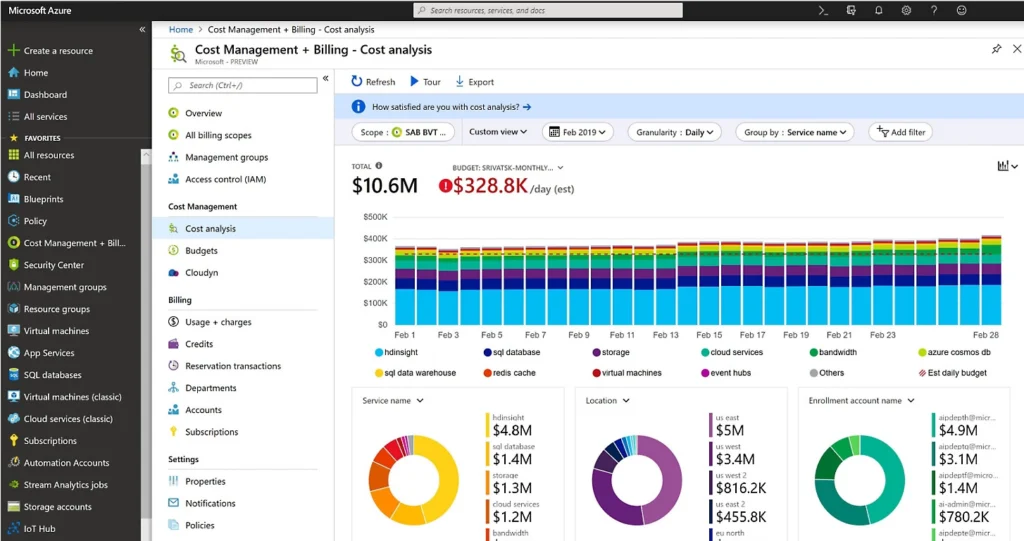
This is FinOps ground zero. Azure Cost Management gives you detailed breakdowns of spending across subscriptions, resource groups, and individual resources. You can slice and dice data by department, project, service or any dimension that matters to your business – providing you’ve got a consistent tagging strategy in place.

The real power comes from its analysis capabilities. You can track spending trends, forecast future costs, and identify anomalies before they become problems. Set up custom views for different stakeholders – executives get high-level dashboards while engineers drill into resource-level details.

Azure Advisor: Automated recommendations engine

Azure Advisor is a sort of personal FinOps consultant that never sleeps. It continuously analyses your Azure usage and provides personalised recommendations for cost optimisation. Found oversized VMs? Advisor flags them. Paying for premium storage where standard would suffice? It’ll let you know.

Advisor doesn’t only identify problems; it quantifies the potential savings and gives you step-by-step remediation guidance.

Azure FinOps Workbook: Pre-built dashboards and insights

Azure FinOps workbooks are like having a pre-configured analytics platform designed specifically for cloud financial management. It gives you visualisations and insights that’d otherwise take weeks to build from scratch.

These workbooks help you track key FinOps metrics: cost per customer, unit economics, budget variance, and utilisation rates. They’re customisable too – adapt them to your specific KPIs and share them across teams for consistent reporting.

Azure Monitor: Connecting performance to cost

Azure Monitor bridges the gap between technical performance and financial impact. When you use it to correlate performance metrics with cost data, you can make informed decisions about scaling and optimisation.

For instance, if a service is running at 10% CPU utilisation but costing hundreds per month, Monitor helps you spot this inefficiency. It highlights not just what resources cost, but whether or not they’re delivering value.

Power BI integration: Custom reporting for stakeholders

Power BI lets you create custom FinOps dashboards that speak to your specific stakeholders. So for example you can build executive scorecards, departmental chargeback reports, or detailed engineering analytics.

The native integration between Azure Cost Management and Power BI means you’re working with live data, not last week’s export. You can create interactive reports that let users explore costs themselves rather than queuing up requests to IT.

Azure Resource Tags: The foundation of cost allocation

Tags might seem a bit boring, but they’re the foundation of effective FinOps. Proper tagging strategy lets you allocate costs accurately, track spending by project or department, and enforce those all-important governance policies.

Azure supports up to 50 tags per resource, and with Azure Policy, you can enforce tagging standards automatically. No more untagged resources sneaking through and muddying your cost allocation. For more on governance and policy enforcement, check out our guide to mastering cloud compliance with Azure Policy.

Azure FinOps best practices that deliver results 

Having the right tools is one thing – using them effectively is another. Here are the Azure FinOps best practices that consistently deliver results:

Start with a tagging strategy (before it’s too late)

If there’s one thing we’d tattoo on every Azure administrator’s forehead, it would be “implement tagging from day one.” Retrofitting tags onto thousands of resources is painful and error-prone. Define your tagging taxonomy early: cost centre, project, environment, owner, and expiry date are good starters.

Use Azure Policy to enforce tagging standards. Require tags for resource creation. Set up automated reports that highlight untagged resources. Your future self will thank you when you’re trying to figure out why the marketing department’s Azure bill doubled last month.

Implement showback before chargeback

Jumping straight to chargeback (where departments pay for their actual usage) can create resistance and confusion. Start with showback – simply showing teams what they’re spending without making them pay for it.

This approach lets teams understand their consumption patterns and adjust behaviours without the pressure of immediate financial consequences. Once everyone’s comfortable with the metrics and accountability model, transitioning to chargeback becomes much smoother.

Set up automated alerts and budgets

Waiting for humans to notice overspending is a recipe for budget disasters. Configure automated alerts at multiple thresholds – 50%, 75%, 90%, and 100% of budget. Send these to both technical and financial stakeholders.

Azure allows you to set budgets at various scopes – subscription, resource group, or even individual resources. You can also configure actions when budgets are exceeded, from sending emails to automatically shutting down non-critical resources.

Regular FinOps reviews (not just monthly bills)

Make FinOps reviews a regular ritual, not a monthly panic. Depending on the size of your company or cloud infrastructure, you could try:

  • Regular stand-ups to review spending anomalies
  • Monthly deep-dives into optimisation opportunities
  • Quarterly strategic reviews of reserved instance purchases and architectural decisions

These reviews should include both technical and financial stakeholders. Share wins, discuss challenges, and plan improvements together. You want to aim to build a culture of continuous optimisation, not just reacting to bills.

Reserved Instances and Savings Plans strategy

Reserved Instances and Savings Plans can offer significant savings, with reserved instances able to slash costs by up to 72%, but they need a bit of strategic thinking up-front. Analyse your baseline usage – the steady-state consumption that you’re confident won’t decrease. That’s your reservation target.

Start conservative with one-year terms for workloads you’re certain about. Use Azure Advisor‘s recommendations as a starting point, but validate them against your roadmap.

Read more about how to save with Reserved Instances and Savings Plans.

Right-sizing based on actual usage

Overprovisioning is the silent killer of cloud budgets. Use Azure Monitor metrics to understand actual resource utilisation over time. If that D8s_v6 VM never exceeds 30% CPU, you’re probably paying for capacity you don’t need.

But right-sizing isn’t just about downsizing. Sometimes upgrading to a larger instance that can handle load more efficiently actually reduces costs. It’s about finding the sweet spot between performance and price.

The AI advantage in Azure FinOps 

Artificial intelligence is revolutionising how we approach FinOps, and Azure’s AI capabilities give you a significant edge in managing cloud costs intelligently.

How AI tools help analyse spending patterns

Microsoft Copilot can analyse your Azure spending data and surface insights you might miss. Ask it questions like “What caused our compute costs to spike last Tuesday?” or “Which resources are growing fastest month-over-month?” Instead of diving through spreadsheets, you get instant, actionable answers.

Copilot can also help you understand complex billing items, suggest optimisation strategies, and even generate reports for stakeholder meetings. As we explored in our comparison of Copilot 365 vs Copilot Studio, choosing the right AI tool depends on your specific needs – but for FinOps, the standard Copilot integration often provides enough insight.

And AI-powered predictive analytics in Azure can forecast future spending based on historical patterns and current trends. This isn’t just linear projection – it accounts for seasonality, growth trends, and even correlates with business metrics. These predictions help you set realistic budgets and identify potential cost overruns before they happen.

Making FinOps stick in your organisation 

The technology and practices we’ve discussed are the backbone of FinOps, but it ultimately succeeds or fails based on cultural adoption. Here’s how to make it stick:

Getting buy-in from both finance and engineering

FinOps requires both camps to step outside their comfort zones. Finance needs to understand that cloud spending is variable and usage-based, not fixed like traditional IT. Engineering needs to accept that cost is a non-functional requirement, just like performance or security.

So start by finding champions in both teams. The engineer who’s passionate about optimisation, or the finance analyst who gets excited about real-time data. Let them lead by example and share their wins.

Starting small with pilot projects

Don’t try to implement FinOps across your entire Azure estate overnight. Pick a single application or department as your pilot. Implement the full FinOps toolkit, establish processes, and demonstrate results.

Use this pilot to refine your approach, build confidence, and create success stories. Nothing sells FinOps better than showing a 30% cost reduction while improving performance. Once other teams see these results, they’ll be asking to join rather than being forced to participate.

Celebrating wins (not just cost cuts)

Yes, cost reduction is important, but it’s not the only FinOps win worth celebrating. Recognise teams that improve their tagging compliance. Celebrate engineers who factor cost into their design decisions. Acknowledge finance team members who help technical teams understand billing complexities.

Create a culture where financial efficiency is valued alongside technical excellence. Share success stories in company meetings. Consider creating a FinOps champion programme with recognition and rewards.

Need some advice on your FinOps journey? 

Whether you’re just starting your cloud build or you’re looking to optimise an existing Azure environment, having the right partner makes all the difference. We’ve helped organisations across the UK optimise their Azure spending and introduce FinOps practices that deliver real ROI.

Ready to take control of your Azure spending? Get in touch to find out more


Subscribe to our newsletter

Stay ahead of the curve with the latest trends, tips, and insights in cloud computing

thank you for contacting us image
Thanks, we'll be in touch.
Go back
By sending this message you agree to our terms and conditions.